
Getting Started
Getting started in Shufflrr Blob follows the Backstage, Podium, and Screen workflow:
- Open Workspace.
- Confirm which agents are active.
- Search or browse for slides in Backstage.
- Add your selections to Podium.
- Present them on Screen.
1. Open the workspace
Log in to your Shufflrr AI Presentation Blob. The URL is https://yourblobname.shufflrr.com (use your organization’s blob host name in place of yourblobname).
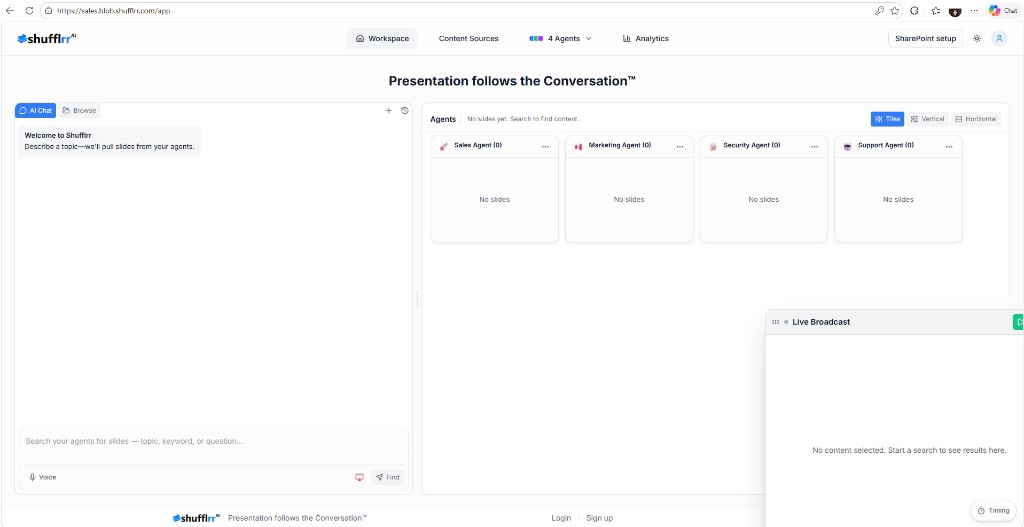
Open Workspace in the top navigation. The direct path is /app.
2. Check active agents
Open the Agents control in the top navigation (for example, 4 Agents). The menu lists the assistants currently participating in searches and their status. Select Manage All Agents to open /agents.
3. Enter a prompt
In Backstage, keep AI Chat selected and type a topic, keyword, question, or exact phrase into Search slides or use "quotes" for exact phrase.... Examples:
- Prepare a Q3 board review deck with financial highlights
- Build a new hire onboarding presentation
- Find sales slides for healthcare prospects
Click Find to submit the search. Use quotation marks when you need an exact phrase.
4. Review and queue results
Review the returned slides privately in Backstage. Add the slides you may present to Podium, then open Podium to organize and preview the queue.
5. Present on Screen
Open Screen from the left workspace rail. Screen is the audience-facing view and includes the presentation timeline.
Tip: More specific prompts usually produce better results.