
Sign in to the Shufflrr Add-in
The Shufflrr Add-in gives you direct access to your company's Shufflrr presentation library inside PowerPoint. You can search, drag, and insert branded slides, edit presentations, and upload updates — all without leaving PowerPoint.
This add-in works with Office 365 PowerPoint. You sign in once to connect OneDrive, Shufflrr, and SharePoint in the task pane.
Steps
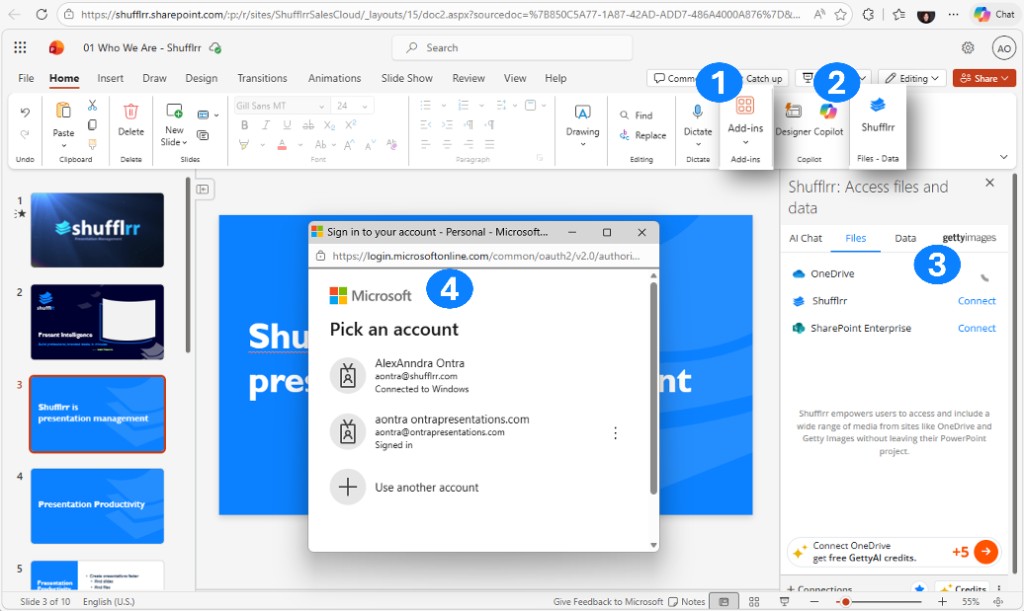
- In PowerPoint, open Add-ins on the Home ribbon, or use the Shufflrr button in the ribbon (under Files – Data next to Designer / Copilot) to open the task pane.
- In the Shufflrr pane (Shufflrr: Access files and data), open the Files tab. You’ll see OneDrive, Shufflrr, and SharePoint — use Connect where needed.
- When prompted, complete Microsoft sign-in (pick your account or use another account).
- After you’re signed in, your connected sources appear in the task pane so you can browse files.
Troubleshooting sign-in
| Issue | Cause | Fix |
|---|---|---|
| "Not Connected" error | Missing callback URL in Azure | Add the correct Redirect URI under Web + SPA in your app registration. |
| Login fails | Wrong client secret value | Update with the actual secret in the Shufflrr admin portal. |
| Add-in doesn't load | PowerPoint environment is not supported | Use Office 365 PowerPoint. |
Tip: Allow browser pop-ups from Shufflrr and Microsoft so sign-in windows can open.
Connect SharePoint
- Open the Shufflrr Add-in in Office 365 PowerPoint.
- In the Shufflrr pane, open the Files tab.
- Locate SharePoint.
- Click Connect.
- When prompted, complete Microsoft sign-in by choosing your account or using another account.