
Shufflrr AI in the Add-in
Does the Shufflrr Add-in have AI?
Yes. The Shufflrr Add-in includes AI search. You can connect OneDrive, Shufflrr, SharePoint, and Dynamics as searchable sources.
How Shufflrr AI works
Shufflrr AI looks in your connected business sources and returns approved files that answer your prompt. It does not generate made-up answers. Instead, it surfaces compliant, on-brand presentation content prepared by your organization.
Steps
- Open the AI Chat tab (first tab in the Shufflrr Add-in task pane).
- Confirm your sources are connected from Connections / + Connections (bottom-left of the pane). You can connect OneDrive, Shufflrr, SharePoint, and Microsoft Dynamics.
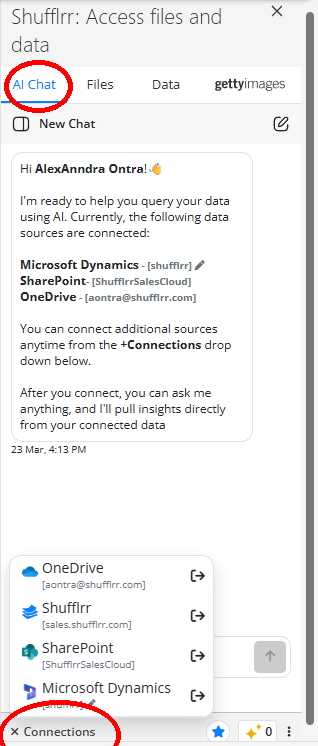
- Ask a specific question and, when possible, specify where to search.
- Review the files Shufflrr AI returns.
- Click a result file to open the preview below, then scan thumbnails and insert the needed slide or image.
Tip: More specific prompts usually produce better results.